Robot Simulation with Gazebo & URDF
Introduction
Testing robotics algorithms on real hardware is expensive, time-consuming, and risky. Simulation solves this by creating virtual environments where you can test, iterate, and break things without consequences. This is the essence of the Digital Twin.
In this lesson, we will cover two critical skills:
- Gazebo: The physics engine and environment simulator.
- URDF: The standard way to describe a robot's physical structure.
Learning Objectives
By the end of this lesson, you will be able to:
- Understand the Gazebo architecture and physics engines.
- Create custom Gazebo worlds with terrain and lighting.
- Define robot models using URDF (Links, Joints, Inertial properties).
- Use XACRO to create modular, maintainable robot descriptions.
- Integrate simulated sensors (Cameras, LIDAR) with ROS 2.
Gazebo Simulation Fundamentals
Gazebo is the industry-standard robot simulator. It operates on a client-server architecture:
- gzserver: Runs the physics loop and sensor generation.
- gzclient: The graphical interface that renders the scene.
Gazebo Architecture & The Bridge
Gazebo uses its own transport layer. To talk to ROS 2, we use the ros_gz_bridge.
graph TB
    subgraph "Gazebo Simulation Stack"
        ROS2["ROS 2 Nodes"]
        Bridge["ros_gz_bridge"]
        Gazebo["Gazebo Physics"]
        Plugins["Sensors & Actuators"]
    end

    ROS2 -->|Topics| Bridge
    Bridge -->|gz::msgs| Gazebo
    Gazebo --> Plugins
    Plugins -->|Sensor Data| Bridge
Physics Engines
Gazebo supports multiple physics backends:
- ODE: Fast, stable, good for general robotics (default).
- Bullet: Good for soft bodies.
- DART: High accuracy for manipulation and humanoids.
The max_step_size parameter defines the simulation accuracy. 1ms (0.001s) is standard. For fast robots, use 0.5ms.
URDF Modeling
To simulate a robot, we must describe it. We use URDF (Unified Robot Description Format). It is an XML file that defines the robot's physical properties.
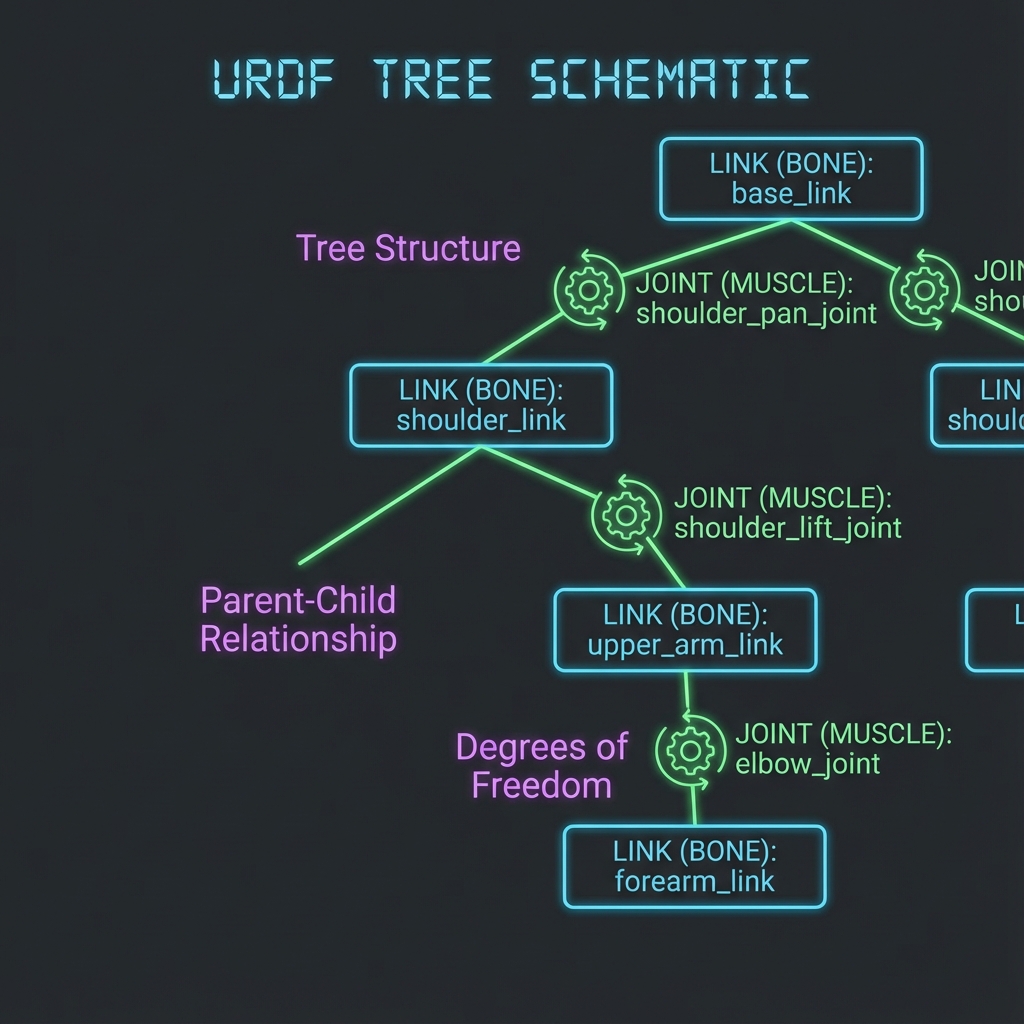
Links and Joints
- Link: A rigid body (e.g., forearm, wheel). Must have:
<visual>: How it looks.<collision>: Physical shape for physics engine.<inertial>: Mass and inertia tensor.
- Joint: Connection between links (revolute, continuous, fixed).
Minimal URDF Example
<robot name="simple_bot">
  <!-- Base Link -->
  <link name="base_link">
    <visual>
      <geometry><box size="0.5 0.3 0.1"/></geometry>
    </visual>
    <collision>
      <geometry><box size="0.5 0.3 0.1"/></geometry>
    </collision>
    <inertial>
      <mass value="5.0"/>
      <inertia ixx="0.1" ixy="0" ixz="0" iyy="0.1" iyz="0" izz="0.1"/>
    </inertial>
  </link>
</robot>
If you omit <inertial> tags, Gazebo will treat links as massless, causing the robot to float or fly away!
Using XACRO for Modularity
Writing raw URDF allows for duplication (e.g., defining 4 identical wheels). XACRO (XML Macros) solves this.
Example: Parameterized Wheel Macro
<xacro:macro name="wheel" params="prefix reflect">
    <link name="${prefix}_wheel">
        <visual>
            <geometry><cylinder radius="0.1" length="0.05"/></geometry>
        </visual>
        <!-- Collision & Inertial omitted for brevity -->
    </link>
    <joint name="${prefix}_wheel_joint" type="continuous">
        <parent link="base_link"/>
        <child link="${prefix}_wheel"/>
        <origin xyz="0 ${reflect*0.2} 0" rpy="1.57 0 0"/>
    </joint>
</xacro:macro>

<!-- Create two wheels -->
<xacro:wheel prefix="left" reflect="1"/>
<xacro:wheel prefix="right" reflect="-1"/>
Adding Sensors
Sensors in Gazebo require two parts:
- URDF Definition: Visual/Physical link + Joint.
- Gazebo Plugin: Logic to generate data and publish to ROS.
Camera Sensor Example
<gazebo reference="camera_link">
  <sensor type="camera" name="front_camera">
    <update_rate>30.0</update_rate>
    <camera>
      <horizontal_fov>1.3962634</horizontal_fov>
      <image>
        <width>800</width>
        <height>600</height>
        <format>R8G8B8</format>
      </image>
    </camera>
    <plugin name="camera_controller" filename="libgazebo_ros_camera.so">
      <ros>
        <remapping>image_raw:=/camera/image_raw</remapping>
      </ros>
    </plugin>
  </sensor>
</gazebo>
Visualizing and Simulating
Validating in RViz
RViz visualizes what the robot thinks is happening. It uses the robot_state_publisher to read specific joint states.
ros2 launch urdf_tutorial display.launch.py model:=my_robot.urdf
Spawning in Gazebo
To simulate physics, you spawn the model into a Gazebo world.
ros2 launch gazebo_ros gazebo.launch.py world:=empty_world.world
ros2 run gazebo_ros spawn_entity.py -entity my_bot -file my_robot.urdf
Self-Assessment Questions
-
Why do we need
<collision>geometries different from<visual>?Details
Answer
Performance. Physics engines work faster with simple shapes (boxes, cylinders) than complex meshes. Visuals can be high-poly matches, but collisions should be simple primitives. -
What is the role of
ros_gz_bridge?Details
Answer
It translates messages between Gazebo's internal transport system and ROS 2 topics, allowing your ROS nodes to see Gazebo sensor data. -
Why use XACRO instead of URDF?
Details
Answer
XACRO allows using variables, macros, and math to reduce code duplication and make maintainable, parameterized robot descriptions.
Summary
You have learned how to build the Digital Twin of a robot:
- Gazebo provides the physics and world simulation.
- URDF defines the robot's physical structure (Links/Joints).
- XACRO makes modeling modular.
- Sensors connect the virtual world to your ROS 2 algorithms.